Points > Point Editor > HyperPoint Properties
Click here to go to help for the General tab. Click here to go to help for the History tab. Click here to go to help for the Point reference tab. Click here to go to help for the Comments tab. Click here to go to help for the Application tab. Click here to go to help for the String tab.

HyperPoint Properties

This page contains the script used by the point. The HyperPoint page is shown when the HyperPoint check box (included on the General page) is set to 1 (Yes).

The Activate Script flag must be set to 1 (Yes) for scripting on the point to be active. In addition, the current value service of the point must be a service for which scripting is enabled.

Note: You cannot import script into a point. The field is read-only. However, you can use the CygNet Point Script Copy utility (PointCfgScriptCopy.exe) to load script into a point. See CygNet Point Script Copy Utility for more information.

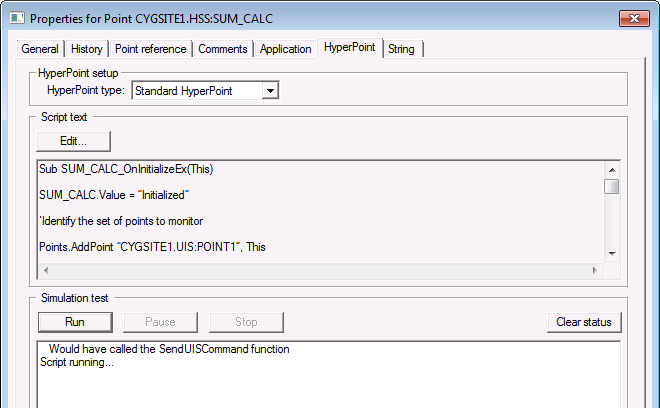
Point Properties HyperPoint page
Sample HyperPoint page for an Existing Point

HyperPoint Properties

These are the properties shown on the HyperPoint page in the PNT Editor. See HyperPoint Scripting for more information.

See Token Categories - Point: HyperPoint for the corresponding tokens for each property and Filter Attributes - Point: HyperPoint for the corresponding filter attributes for each property.

Property Description Default Value

HyperPoint type

Specifies the type of HyperPoint. Possible values are as follows.

  • Standard HyperPoint (S) — A Standard HyperPoint is a self-contained HSS point, that does not call or include any other script.
  • Library HyperPoint (L) — A Library HyperPoint is an HSS point that contains script designed to be used by other HyperPoints, called Library User HyperPoints. It can be called from multiple other HyperPoints, which access a temporary copy of its script. This means that any changes made to a Library HyperPoint script will apply to all its users. Library HyperPoints are not recommended for script processing.
  • Library User HyperPoint (U) — A HyperPoint that uses a Library HyperPoint is called a Library User HyperPoint. Multiple instances of Library User HyperPoints can use the same Library HyperPoint. Library User HyperPoints are recommended for script processing.

Standard HyperPoint

Script text

Displays the script currently contained in the HyperPoint.

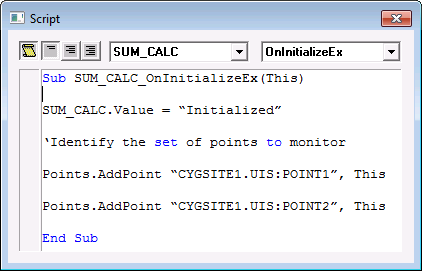
  • Click View to access a syntax-highlighted view of the script in View (or read-only) mode.

Script view


Simulation test

Contains the simulation controls you can use to test a HyperPoint’s script before putting it to use.

 
Back to top

Let us know how we can improve this topic.

CygNet at weatherford.com

© 2020 Weatherford. All rights reserved.